Compare MaxAI, AI Blaze, and Sider: Which Extension is the Best?
| Key Features A summary of the most important features offered by each extension. |
|
|
|
|---|---|---|---|
| Our Rating Tooltivity's expert review score for each extension, based on hands-on testing and research. | 8.6 | 9.0 Winner in this category | 8.7 |
| Total users Total active users across all major browsers: Chrome, Edge, Firefox, and Safari. | 246,052 | 70,000 | 9,168,797 Winner in this category |
| Total ratings Total number of user ratings received across all supported browsers. | 2,344 | 183 | 117,582 Winner in this category |
| Average rating Average user rating across all browsers, calculated from available store ratings. | 4.8 ⭐ | 5.0 ⭐ Winner in this category | 4.9 ⭐ |
| Entry Level Price The minimum price required to start using the extension. "Free" means a free tier is available. | Free | Free | Free |
| Chrome User rating and stats for the extension on Chrome browser. | - |  5.0 4.94 Average Chrome Web Store rating from the last 100 reviews 70.0K+Users Winner in this category | 4.9 4.89 Average Chrome Web Store rating from the last 100 reviews 6.0M+Users |
| Edge User rating and stats for the extension on Edge browser. |  4.8 4.94 Average Microsoft Edge Store rating from the last 100 reviews 246.1K+Users Winner in this category | - | 4.8 4.31 Average Microsoft Edge Store rating from the last 100 reviews 3.2M+Users Winner in this category |
| Firefox User rating and stats for the extension on Firefox browser. | - | - | - |
| Safari User rating and stats for the extension on Safari browser. | - | - | - |
| Features Tooltivity's expert score for the 'Features' aspect of each extension. | 9.2 MaxAI offers a rich set of features in a single extension. Its standout AI sidebar lets you chat, analyze files, and ask questions about the webpage as you browse. Writing assistance tools—like one-click improvement, tone adjustment, grammar checks, and handy translation—work well across sites. A highlight is the ability to query multiple AI models at once (Pro), making it easy to compare answers for research or fact-checking. Web search with cited sources and reusable prompts further improve productivity. Image generation (Pro) is available with models like DALL·E 3, but it’s more an extra than a core feature. File upload limits can be restrictive, even for Pro users. Overall, the features are broad, polished, and useful for most reading, writing, and research needs. | 8.8 The AI writing aid worked very well in the test with emails, customer responses, and short formats. We particularly liked the dynamic templates, which adapt according to user input. The extension can therefore be adapted for both commercial use, such as quickly replying to emails, and for everyday private use. From summaries to social media texts, this helped enormously in the test. In particular, learners such as students should have a special added value here, for example, through summaries that can be created quickly. 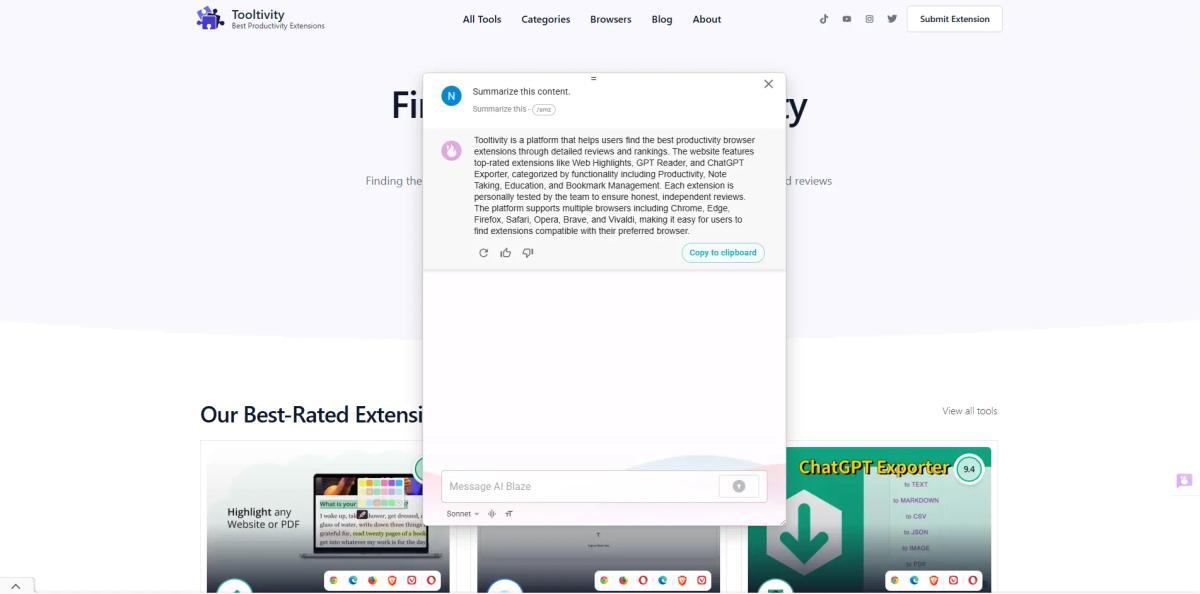
| 9.5 Sider offers a comprehensive range of functions and is designed to provide a solution for every possible use of AI. From AI writing assistance to PDF analysis, for example, it covers all areas for every blogger. Creatives also get their money's worth here, whether creating images from text or editing photos, Sider offers these functions in just one tool and integrates the functions of other providers into your one tool. 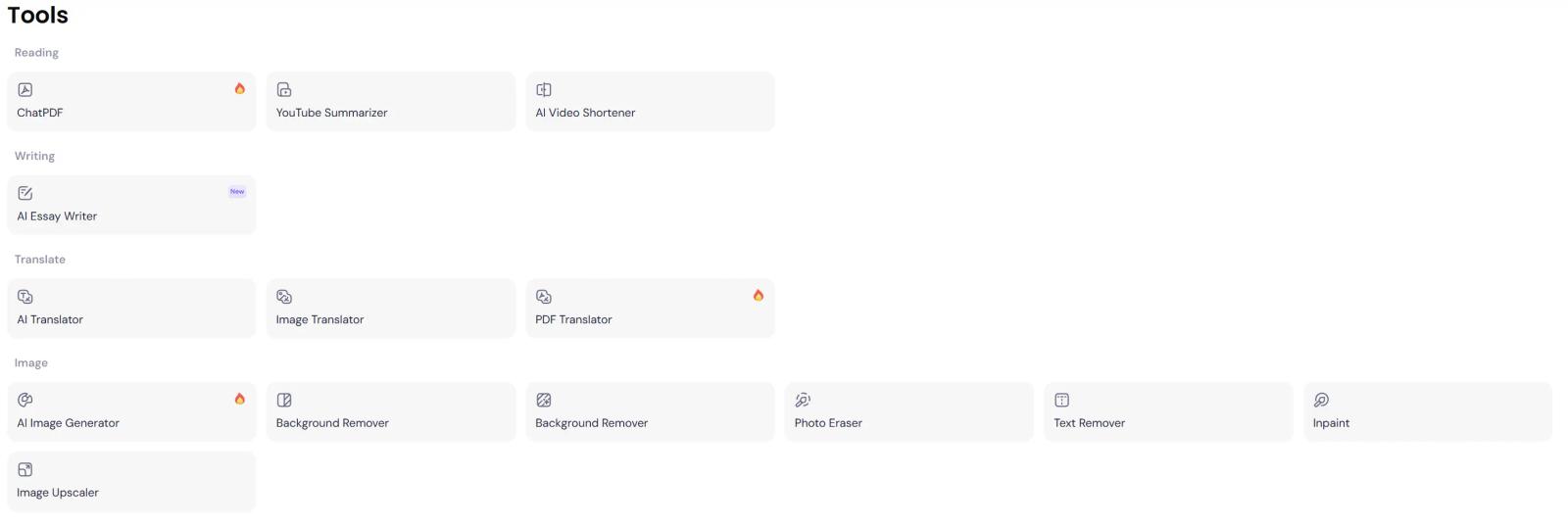 The number of integrated AI models, such as GPT-4o, Claude, or Gemini, also stands out. This ensures that users have access to the latest technology. 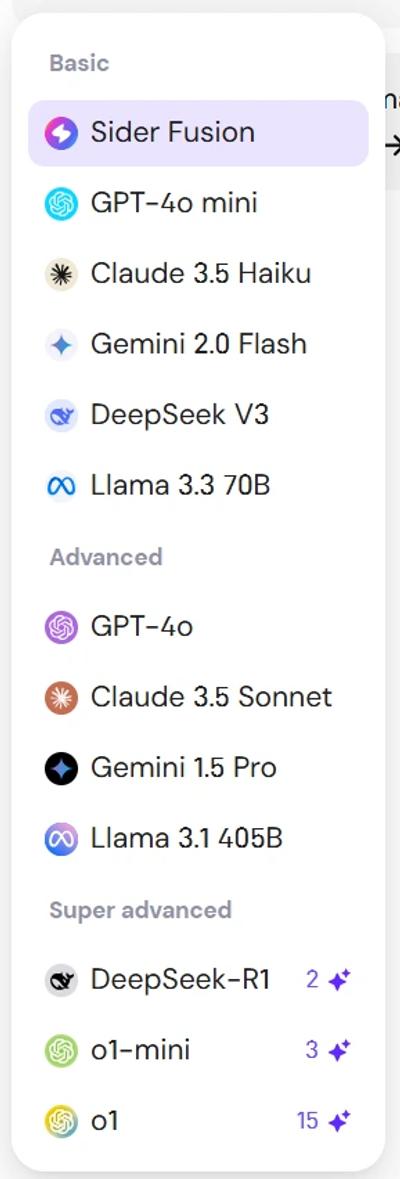 In summary, Sider offers almost all of the current possibilities of AI in one tool. Winner in this category |
| Performance Tooltivity's expert score for the 'Performance' aspect of each extension. | 8.0 MaxAI is generally fast and responsive. The extension loads quickly, integrates smoothly with sites, and the sidebar and chat work without lag. AI responses are prompt, though more advanced models and web search can take longer. The extension is a bit large (25.88 MiB), but doesn’t slow down most browsers unless you're on older hardware. Some minor issues exist, like the sidebar not always remembering scroll position or chat state. Context menu actions are instant, and file uploads process at reasonable speeds. Image generation works well, but depends on your chosen model. One limitation is the lack of a way to cancel long-running requests. Overall, performance is good and reliable for daily use, but not exceptional. | 8.9 In our test, AI Blaze worked reliably on most websites and in various applications. The only thing that was immediately noticeable at the beginning was that the functions do not work in the Chrome Store, so websites may prevent access for the extension, but this did not otherwise occur in the test.  The text expansion works immediately, and the AI-controlled functions generally respond quickly, depending on the model selected. When using the most advanced AI models for complex tasks, there were occasional short delays, but these were minimal. | 9.2 Sider generally performs well in the test with fast response times and reliable functions. The integration of multiple AI models ensures that users receive accurate and relevant information. However, there can be occasional delays, especially when using advanced features or at peak times. Continuous updates and optimizations could further improve performance. Winner in this category |
| Design Tooltivity's expert score for the 'Design' aspect of each extension. | 8.5 MaxAI features a clean, modern interface that doesn’t clutter your browser. The sidebar is unobtrusive and easy to toggle, and the chat UI is familiar for anyone who’s used ChatGPT or similar tools. Context menu integration works smoothly across sites, providing helpful AI options without getting in your way. Settings are extensive but organized, though new users might find the options a bit overwhelming at first—thankfully, the defaults work well. The color scheme and typography are professional, with a solid dark mode available. Occasionally, the extension feels slow to load or when switching AI models, but design elements like loading indicators help. Overall, MaxAI’s design is polished, functional, and ideal for productivity without getting in your way. | 8.8 The clear, intuitive user interface should also make AI Blaze possible for private users who are not so tech-savvy. The integration into the sidebar is very well done and offers a seamless integration into the design of the browser. Winner in this category | 8.5 The design of Sider is very user-friendly, and the interface is quite clear, so it's easy to find anything. The sidebar is great because you can access features without leaving the page. However, it might feel cluttered for some people as there are so many options. A sleeker design could improve the user experience. |
| Value for Money Tooltivity's expert score for the 'Value for Money' aspect of each extension. | 7.5 MaxAI’s value depends on your needs. The free plan is great for most casual users, with unlimited basic chats and 3 Pro chats per day. Power users get the most from the $12/month Pro (billed yearly), which is cheaper than buying separate AI subscriptions and lets you use multiple top models in one place. However, the $30/month billed monthly is expensive. Pro features—like access to smarter models and better search—are genuinely useful, but most basics are already included for free. Image generation and team tools are nice extras but not essential for everyone. If you want advanced AI in your browser, MaxAI Pro at the yearly rate is a good deal. For casual users, the free tier is likely enough. Overall, the value is good, but not outstanding. | 9.0 In this area, a clear distinction must be made between private and commercial users. For the private user, AI Blaze already offers enough functionality for most people in the free plan. Here we also appreciate the Academic Edition, which offers students and teachers extended, free access. The Pro plan could be too high for private users at $20/month with annual billing. For businesses, however, AI Blaze's Pro plan offers exceptional value compared to similar productivity tools. The time savings alone can justify the investment for most users. For those who want to work in teams, AI Blaze offers the Business plan for $24/user/month. This includes additional comprehensive functions for collaboration and improved communication processes. Compared to alternatives, AI Blaze offers a competitive feature set at a reasonable price for businesses. The ROI is clear after just a few days of regular use, especially for those who frequently write similar messages. Winner in this category | 7.8 While Sider offers a free version with limited requirements, the premium plans can be expensive for casual users. While the feature set justifies the cost for power users, those who only need basic features may find it expensive. The availability of different pricing tiers offers flexibility, but an intermediate solution with a cheaper option could appeal to a wider audience. |
| Ease of Use Tooltivity's expert score for the 'Ease of Use' aspect of each extension. | 8.8 MaxAI is easy to use, even for those new to AI browser extensions. Onboarding is simple—just install, reload, and you're ready. The AI sidebar works like a familiar chat, and context menu options such as improve, translate, and summarize are intuitive and work smoothly across websites. Reusable prompts are quick to set up for repetitive tasks. While the settings page offers lots of options (which may be overwhelming at first), defaults work well, so most users won't need to change anything. Most features are self-explanatory, so there's hardly any learning curve. Minor gripe: the sidebar sometimes doesn't remember your preferred AI model between sessions. Overall, MaxAI balances advanced features with straightforward usability, making it accessible for beginners and efficient for power users. | 9.0 For basic functions such as using templates and simple shortcuts, AI Blaze is extremely straightforward. New users can start using the ready-made templates within minutes, and they are well-explained. If you don't want to use the predefined shortcuts, you can create your own commands immediately, which makes it easier to remember the shortcuts in everyday life. We found the shortcuts intuitive and time-saving once you have memorized them. The search function makes it easy to find the right snippet quickly, even as the library grows. The advanced functions do require a certain amount of learning, but the basic functions are easily accessible straight away. Winner in this category | 9.0 In our tests, Sider was easy to use without having to learn how to use it. The tooltips and instructions help you get started right away. It works well in our tests with popular browsers such as Chrome and Edge, which are quick to install and use. However, if you want to delve into the advanced functions, it can take a while to get to grips with everything. Basic users might be a little overwhelmed here. Winner in this category |
| Security & Privacy Tooltivity's expert score for the 'Security & Privacy' aspect of each extension. | 9.5 MaxAI stands out for its clear privacy policy and transparent data practices. It only collects your email and name for identification and syncing settings, and explicitly states it does not gather browsing data, chat history (except what’s needed to function), or site info. The extension requires standard browser permissions, which are explained at install. User data—like webpage content and chats—is sent to third-party AI providers (OpenAI, Google, etc.) as part of how the tool works. MaxAI doesn't sell your data or track your browsing, but you should be aware that external AI services will process what you send. Their data retention is minimal, and you can request deletion by deactivating your account. The extension avoids sensitive pages like the Chrome Web Store for security. The only real privacy downside is that, as with any AI tool, your data is handled by external providers. Overall, MaxAI is more privacy-conscious and transparent than most extensions in its category. | 9.7 AI Blaze takes security very seriously and holds a SOC 2 certification, which confirms that a company has implemented appropriate controls and procedures for IT systems, data protection, and data security. The company's privacy policies are transparent from the user's perspective in terms of how data is handled, and no user data is sold to third parties. The Business and Enterprise plans offer additional security features such as SAML SSO integration and audit logs. Choosing between different AI models gives users more control over their data. The company is transparent about its use of cookies and analytics and provides clear options for managing settings. There is also the option to allow the extension only to use marked areas for answers, normally, the AI uses the entire website content to have a better data basis. 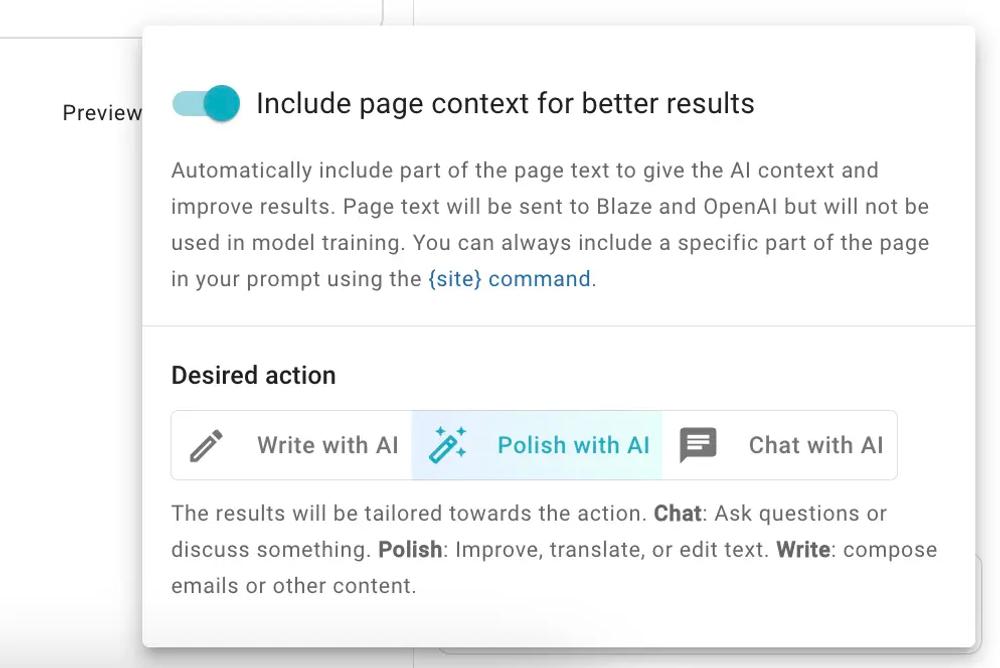 Winner in this category | 8.0 Sider stores the data on Amazon's US servers. The data protection guidelines are transparent and users have control over their data. However, usage data is collected for analysis purposes, which not every user will find acceptable. The assurance that data is never passed on and no spam messages are sent is a positive aspect. |
| Conclusion A summary of our findings and final thoughts for each extension. | After weeks of daily use, we can confidently say that MaxAI is one of the better AI browser extensions we've tested. It combines multiple AI models into a clean, easy-to-use interface that actually works where you need it. The sidebar stays accessible, the context menu is intuitive, and the integration with websites like Gmail, Google Docs, and LinkedIn is genuinely helpful. But here's the thing: MaxAI isn't perfect. The free tier is limited, and the Pro plan pricing can feel expensive if you're not using it heavily. Some features like image generation are nice-to-have but not essential for most users. And while the interface is clean, it can sometimes feel a bit overwhelming with all the options available. If you're someone who regularly uses AI tools and wants everything in one place, MaxAI Pro is worth considering. The ability to compare answers from different AI models and access smarter models like GPT-5 and Claude-Sonnet-4 is genuinely useful. But if you're just looking for occasional AI help, the free version might be enough—though you'll quickly hit the 3 Pro chats per day limit. Our final verdict? MaxAI is a solid choice if you're willing to invest in the Pro plan. It's well-built, privacy-focused, and genuinely improves productivity. Just make sure you'll actually use the advanced features before committing to the yearly plan. | AI Blaze shows that it is an impressive productivity tool that delivers on its promise of saving time and optimizing communication. The user interface is intuitive and well-designed, making it accessible even for those without experience with AI tools. You can tell that companies in particular are also a target group. The ability to customize templates and train the AI to match your brand's voice is particularly valuable here. While the free version is somewhat limited, the affordable pricing of the paid plans makes it accessible to businesses of all sizes. The time savings alone justify the investment for teams that frequently send similar messages or create repetitive content. Individuals, however, may find it too expensive. | Sider is an AI tool that can significantly increase user productivity across multiple platforms. The high number of features, from writing assistance to image editing, makes it a versatile choice for truly anyone. Although it excels in many areas, there is still room for improvement. In particular, the sometimes high prices will put normal users off. Overall, Sider is a valuable tool for anyone who wants to combine almost all the possibilities of AI in one tool and is willing to pay for it. |
| Our Recommendation | In our comparison between MaxAI, AI Blaze, and Sider, AI Blaze came out on top, scoring 9. Sider is the most widely used, with over 9 million users and 118k+ reviews, but AI Blaze outperformed it in our review. User reviews for AI Blaze reflect our findings, while we rate MaxAI and Sider lower than users do. Notably, AI Blaze has the highest user rating in the Chrome Web Store at 4.97, which supports its strong performance in our review. In the end, the differences between these extensions are minimal, so your choice may come down to personal preference or specific features.
If you want a quick recommendation, AI Blaze is our top pick. But as always, the best choice depends on what matters most to you. | ||


